
A few years ago, turning a sentence into a finished piece of artwork sounded like science fiction. Today it takes about ten seconds and a decent internet connection.
So what is AI image generation, really? In simple terms, it’s a technology that turns written descriptions into original images using computer models trained on huge collections of pictures. Type a sentence, and the system builds a brand-new visual based on what you described.
This guide breaks the whole process down in plain language, no coding or design background required.
What Is AI Image Generation, Exactly?
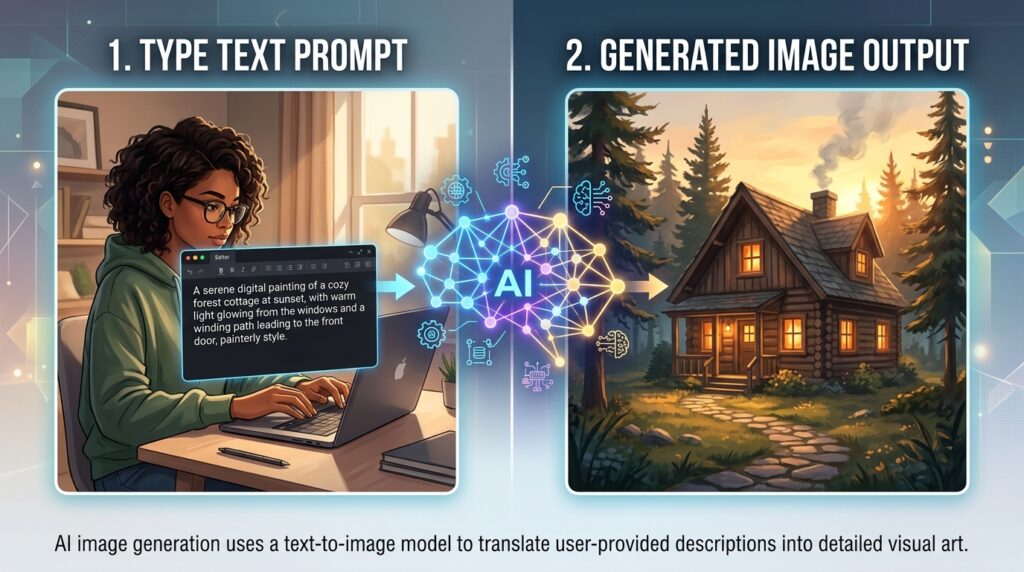
AI image generation is a process where software creates pictures from text prompts, sketches, or existing photos. Instead of a human drawing every pixel, an algorithm predicts what the finished image should look like based on patterns it learned during training.
These systems are often called text-to-image models, and they’ve become one of the most talked-about branches of artificial intelligence in the last few years.
You describe a scene. The model interprets your words, matches them against patterns it has seen before, and builds a picture that has never existed until that moment.
How Does AI Image Generation Actually Work?
You don’t need to understand advanced math to grasp the basic idea. Here’s the simplified version.
Learning From Millions of Images
Before any of these tools can generate anything, they’re trained on massive datasets of images paired with text captions. During training, the model studies the relationship between words like “sunset,” “cat,” or “watercolor” and the visual patterns that go with them.
This training phase teaches the system to associate language with shapes, colors, textures, and composition.
Turning Noise Into Art
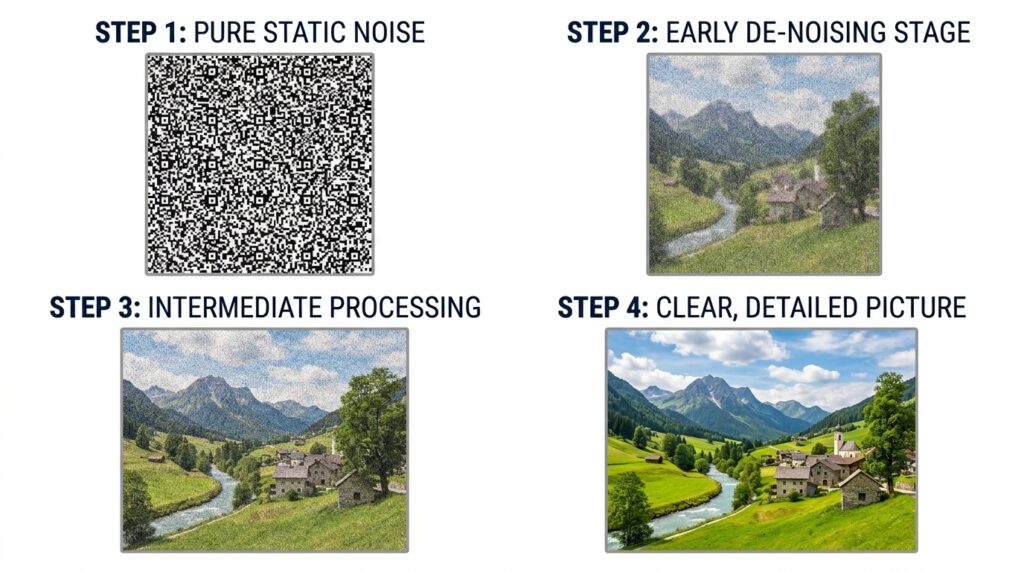
Most modern generators, including Stable Diffusion, use a technique called diffusion. The process starts with random visual noise, similar to television static, and gradually removes that noise step by step until a coherent image matching your prompt appears.
Think of it like sculpting. The model starts with a rough block and slowly refines it based on the instructions you gave it.
Popular AI Image Generators You Should Know
There are dozens of tools available now, each with its own strengths. Here’s a quick comparison of some of the most widely used options.
| Tool | Known For | Best For |
|---|---|---|
| DALL-E | Strong prompt accuracy, built into ChatGPT | Beginners wanting quick, guided results |
| Midjourney | Highly artistic, painterly outputs | Illustrators and concept artists |
| Stable Diffusion (via Stability AI) | Open-source, customizable | Users who want more technical control |
| Adobe Firefly | Commercially safe outputs, editing tools | Marketers and content creators |
| Google Imagen | Photorealistic detail and lighting | Users focused on realism |
Each platform interprets prompts a little differently, so the same description can produce very different results depending on which tool you use.
Getting Started: Creating Your First AI Image
If you’re new to this space, the good news is there’s very little barrier to entry. Most platforms are designed to work well as an AI art generator for beginners, meaning you don’t need any design experience to get usable results.
Here’s a simple process to follow:
- Pick a tool that offers a free tier so you can experiment without commitment
- Write a clear, descriptive prompt (subject, setting, mood, and style all help)
- Generate a few variations and compare them
- Refine your wording based on what worked and what didn’t
- Save or download the version you like best
A basic prompt might be “a cozy cabin in the mountains during autumn, warm lighting, illustrated style.” Notice how it includes a subject, setting, and a style cue. That level of detail usually produces better results than a vague one-word prompt.
Real-World Uses of AI-Generated Images
This technology has moved well past novelty status. People and businesses use it for practical, everyday purposes.
- Marketing and social media, where teams need fast visuals without hiring a photographer for every post
- Concept art and storyboarding, helping creative teams visualize ideas before committing to a final design
- Product mockups, allowing small businesses to preview packaging or branding concepts
- Personal creative projects, like book covers, greeting cards, or hobby art
- Educational materials, where custom illustrations help explain complex topics
The common thread is speed. What once took hours of manual design work can now be roughed out in minutes, freeing up time for refinement and strategy instead of repetitive production work.
Pros and Cons of AI Image Generation
Like any tool, this technology has real strengths and real limitations worth knowing before you rely on it.
Advantages:
- Fast turnaround compared to traditional design work
- Low cost of entry, with many free or affordable tools available
- No professional design skills required to get started
- Easy to explore many creative directions quickly
Drawbacks:
- Results can be inconsistent, especially with hands, text, or fine detail
- Ownership and copyright rules are still evolving and vary by situation
- Heavy reliance on it can limit development of traditional design skills
- Some outputs may unintentionally resemble existing artistic styles
Is AI Image Generation Legal? Copyright and Ownership
This is one of the most common questions beginners ask, and the honest answer is that it’s still being worked out.
Guidance from the U.S. Copyright Office has clarified that images created purely from a text prompt, with no meaningful human creative input, generally are not eligible for copyright protection on their own. However, if you significantly edit, arrange, or combine AI-generated elements with your own original work, that human contribution may be protectable.
In practical terms, this means you can usually use AI-generated images for personal or commercial projects, but you should check the specific terms of service for whichever tool you’re using, since licensing policies differ between platforms.
Expert Tips for Better AI-Generated Images
A few small adjustments can dramatically improve your results.
- Be specific about lighting, camera angle, and mood, not just the subject
- Reference an art style or era, such as “1970s film photography” or “watercolor illustration”
- Generate multiple variations of the same prompt instead of settling for the first result
- Use negative prompts, when available, to exclude unwanted elements
- Keep a personal library of prompts that worked well, so you can reuse and adjust them later
Small wording changes often produce surprisingly different outcomes, so treat prompting itself as a skill worth practicing.
Common Mistakes Beginners Make
- Writing prompts that are too vague, like just “a dog” instead of describing the setting and style
- Expecting perfect results on the first try instead of iterating
- Ignoring the platform’s usage rights before using an image commercially
- Overloading a single prompt with too many conflicting ideas at once
- Not saving prompt variations, making it hard to recreate a favorite result later
Avoiding these missteps early on will save a lot of frustration as you get comfortable with the tools.
Image Prompt: A “before and after” style illustration comparing a vague, low-quality prompt result on the left with a detailed, well-crafted prompt result on the right.
Alt Text: common beginner mistakes in AI image generation prompts
Frequently Asked Questions
Is AI image generation free to use?
Many platforms offer free tiers with limited generations per day or month. Paid plans typically unlock higher resolution, faster processing, and commercial usage rights.
Do I need design skills to use an AI image generator?
No. Most tools are built for people with zero design background. Clear, descriptive writing matters more than artistic training.
Can I sell images made with AI tools?
In many cases, yes, but this depends on the specific platform’s terms of service and how much original human input went into the final piece. Always review the licensing terms before selling.
Why do AI-generated images sometimes look distorted?
Details like hands, text, and complex object interactions are historically harder for these models to render accurately, though newer versions continue to improve on this.
What’s the difference between AI image generation and traditional digital art?
Traditional digital art is created stroke by stroke by a human using software like Photoshop. AI image generation produces a complete image based on a text description, with the model handling the visual execution.
Conclusion
AI image generation has quickly gone from an experimental novelty to a practical creative tool used by hobbyists, marketers, and professional designers alike. At its core, it’s simply a system that translates written ideas into visuals using patterns learned from massive image datasets.
If you’ve been curious about trying it, there’s no better time to experiment. Pick a free tool, write a detailed prompt, and see what comes out. The more you practice describing what you want to see, the better your results will become.